Kanban board
Install
npx shadcn add @klarhimmel/app-boards-kanbanUsage
import { Theme } from '@/components/klarhimmel/theme/style';
import { BlockSurface } from '@/components/klarhimmel/blocks/surface';
import AppBoardsKanban from '@/components/klarhimmel/blocks/app-boards-kanban';

export default function Section() {
  return (
    <Theme theme="brand">
      <BlockSurface>
        <AppBoardsKanban props={{
          "eyebrow": "Events team",
          "title": "Autumn events",
          "description": "Preparations for the weddings and conferences in November.",
          "columns": [
            {
              "title": "To do",
              "cards": [
                {
                  "title": "Confirm florist for the Berg wedding",
                  "assignee": "Maja",
                  "due": "Tue 17 Nov",
                  "status": "Blocked",
                  "overdue": true
                },
                {
                  "title": "Order extra chairs for the garden hall",
                  "assignee": "Oskar",
                  "due": "Fri 20 Nov",
                  "overdue": false
                }
              ]
            },
            {
              "title": "In progress",
              "cards": [
                {
                  "title": "Print the conference name badges",
                  "assignee": "Ida",
                  "due": "Mon 23 Nov",
                  "overdue": false
                }
              ]
            },
            {
              "title": "Done",
              "cards": []
            }
          ],
          "countOne": "card",
          "countLabel": "cards",
          "emptyColumn": "Nothing here yet.",
          "moveLabel": "Move",
          "moveTo": "Move to",
          "moved": "moved to",
          "overdueLabel": "Overdue",
          "state": "filled",
          "messages": {
            "empty": "No cards yet. Add the first one to start the board.",
            "loading": "Loading the board…",
            "error": "We could not load the board.",
            "retry": "Try again"
          }
        }} />
      </BlockSurface>
    </Theme>
  );
}
States
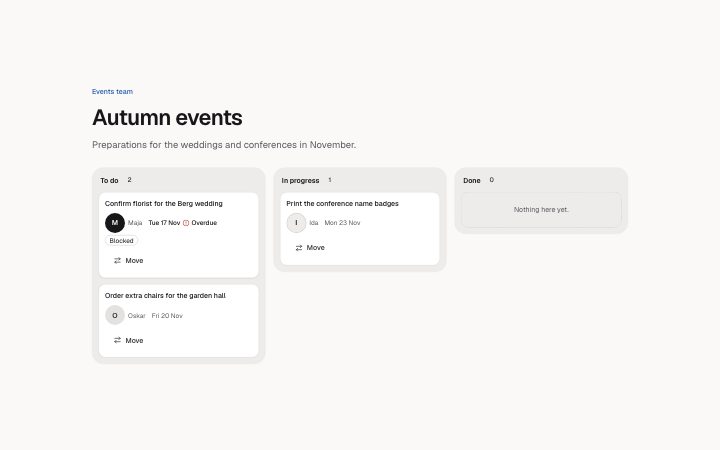
kanban board in 4 forms: filled, empty, loading, error.
state: filled
Events team
Autumn events
Preparations for the weddings and conferences in November.
No cards yet. Add the first one to start the board.
Loading the board…
We could not load the board.To do2 cards
Confirm florist for the Berg wedding
MajaTue 17 NovOverdueBlockedOrder extra chairs for the garden hall
OskarFri 20 Nov
In progress1 card
Print the conference name badges
IdaMon 23 Nov
Done0 cards
- Nothing here yet.
state: empty
Events team
Autumn events
Preparations for the weddings and conferences in November.
No cards yet. Add the first one to start the board.
Loading the board…
We could not load the board.To do
- Nothing here yet.
In progress
- Nothing here yet.
Done
- Nothing here yet.
state: loading
Events team
Autumn events
Preparations for the weddings and conferences in November.
No cards yet. Add the first one to start the board.
Loading the board…
We could not load the board.To do
In progress
Done
state: error
Events team
Autumn events
Preparations for the weddings and conferences in November.
No cards yet. Add the first one to start the board.
Loading the board…
We could not load the board.To do
- Nothing here yet.
In progress
- Nothing here yet.
Done
- Nothing here yet.
Notes
When to use it
A board of columns holding cards, such as tasks by status. For a plain list of rows use `app-data-table`; for a single discussion use `app-comments-thread`.
Writing for it
- Use 2 to 5 columns, each titled in 30 characters or less and holding at most 8 cards. A column title is rendered as a heading, so name it by stage, like In review. - `moveLabel` and `moveTo` (30) name the button that moves a card by keyboard; write them as the verb, such as Move, and the menu lists the other columns. - `moved` (30) is the announcement after a move, with the card and column added, so keep it to a short phrase.
Watch out for
Moves are kept only inside the block until its own data changes, so a reload loses them unless the host stores the result. In the error state the retry puts the board into loading, not back to filled, and only the host can bring it back.
Pairs well with
Usage
The block in a page, with its default content (long lists shortened). Every prop is in the table below.
import { Theme } from '@/components/klarhimmel/theme/style';
import { BlockSurface } from '@/components/klarhimmel/blocks/surface';
import AppBoardsKanban from '@/components/klarhimmel/blocks/app-boards-kanban';

export default function Section() {
  return (
    <Theme theme="brand">
      <BlockSurface>
        <AppBoardsKanban props={{
          "eyebrow": "Events team",
          "title": "Autumn events",
          "description": "Preparations for the weddings and conferences in November.",
          "columns": [
            {
              "title": "To do",
              "cards": [
                {
                  "title": "Confirm florist for the Berg wedding",
                  "assignee": "Maja",
                  "due": "Tue 17 Nov",
                  "status": "Blocked",
                  "overdue": true
                }
              ]
            }
          ],
          "countOne": "card",
          "countLabel": "cards",
          "emptyColumn": "Nothing here yet.",
          "moveLabel": "Move",
          "moveTo": "Move to",
          "moved": "moved to",
          "overdueLabel": "Overdue",
          "state": "filled",
          "messages": {
            "empty": "No cards yet. Add the first one to start the board.",
            "loading": "Loading the board…",
            "error": "We could not load the board.",
            "retry": "Try again"
          }
        }} />
      </BlockSurface>
    </Theme>
  );
}
Props
Columns hold the cards (title, assignee, due, an optional flag, and overdue as a boolean the block says in words). The labels are the Move button, its menu heading and the announcement after a move; state sets empty, loading or error.
| Prop | Type | Default | Description |
|---|---|---|---|
eyebrow | string | 'Events team' | Text, up to 60 characters. Optional; empty is not rendered. |
title | string | 'Autumn events' | Text, up to 120 characters. |
description | string | 'Preparations for the weddings and c…' | Text, up to 300 characters. Optional; empty is not rendered. |
columns | { title, cards }[] | 3 items | List of 2 to 5. Each item: title, cards. |
countOne | string | 'card' | Text, up to 20 characters. |
countLabel | string | 'cards' | Text, up to 20 characters. |
emptyColumn | string | 'Nothing here yet.' | Text, up to 80 characters. |
moveLabel | string | 'Move' | Text, up to 20 characters. |
moveTo | string | 'Move to' | Text, up to 30 characters. |
moved | string | 'moved to' | Text, up to 30 characters. |
overdueLabel | string | 'Overdue' | Text, up to 20 characters. |
state | 'filled' | 'empty' | 'loading' | 'error' | 'filled' | One of 'filled', 'empty', 'loading', 'error'. |
messages | { empty, loading, error, retry } | {…} | Fields: empty, loading, error, retry. |
headingLevel | '1' | '2' | - | One of '1', '2'. Optional; empty is not rendered. |
Install
Installs
app-boards-kanban- Avatar
- Badge
- Button
- Menu
- Skeleton
- About
- A board of columns with cards (title, assignee, due date, status flag). Every card has a Move menu that lists the other columns, so a card moves by keyboard; the move is announced and focus follows the card. Empty columns say so.
- States
- Filled, empty, loading, error. The Move menu is the keyboard way to move a card; the move is announced and focus follows the card.