Plan and usage
Install
npx shadcn add @klarhimmel/app-billing-planUsage
import { Theme } from '@/components/klarhimmel/theme/style';
import { BlockSurface } from '@/components/klarhimmel/blocks/surface';
import AppBillingPlan from '@/components/klarhimmel/blocks/app-billing-plan';

export default function Section() {
  return (
    <Theme theme="brand">
      <BlockSurface>
        <AppBillingPlan props={{
          "eyebrow": "Billing",
          "title": "Your plan",
          "description": "What Exempelhotellet pays for, and how much of it is used this month.",
          "plan": {
            "name": "Team",
            "badge": "Current plan",
            "price": "490 kr",
            "interval": "per month"
          },
          "features": [
            "Up to 15 rooms",
            "2 000 booking messages a month",
            "Guest notes and a shared calendar",
            "Email support, answered within a day"
          ],
          "of": "of",
          "usage": [
            {
              "label": "Rooms",
              "used": "12",
              "limit": "15",
              "unit": "rooms"
            },
            {
              "label": "Booking messages",
              "used": "1840",
              "limit": "2000",
              "unit": "messages"
            }
          ],
          "warnLimit": "Getting close",
          "nearLimit": "Almost full",
          "overLimit": "Over the limit",
          "manage": {
            "label": "Manage billing",
            "href": "#manage"
          },
          "upgrade": {
            "label": "Upgrade plan",
            "href": "#upgrade"
          },
          "state": "active",
          "notices": {
            "trial": "Your trial ends in 3 days. Add a payment method to keep your rooms.",
            "pastDue": "The last payment failed. Update your card to keep the booking page online."
          }
        }} />
      </BlockSurface>
    </Theme>
  );
}
States
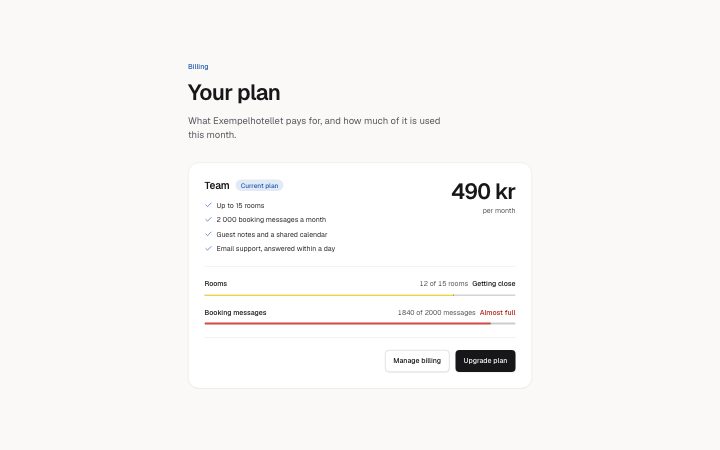
plan and usage in 4 forms: active, trial, pastDue, over the limit and unlimited.
state: active
Billing
Your plan
What Exempelhotellet pays for, and how much of it is used this month.
Your trial ends in 3 days. Add a payment method to keep your rooms.The last payment failed. Update your card to keep the booking page online.Team
Current plan- Up to 15 rooms
- 2 000 booking messages a month
- Guest notes and a shared calendar
- Email support, answered within a day
490 krper month
12 of 15 roomsOver the limitAlmost fullGetting close
1840 of 2000 messagesOver the limitAlmost fullGetting close
state: trial
Billing
Your plan
What Exempelhotellet pays for, and how much of it is used this month.
Your trial ends in 3 days. Add a payment method to keep your rooms.The last payment failed. Update your card to keep the booking page online.Team
Current plan- Up to 15 rooms
- 2 000 booking messages a month
- Guest notes and a shared calendar
- Email support, answered within a day
490 krper month
12 of 15 roomsOver the limitAlmost fullGetting close
1840 of 2000 messagesOver the limitAlmost fullGetting close
state: pastDue
Billing
Your plan
What Exempelhotellet pays for, and how much of it is used this month.
Your trial ends in 3 days. Add a payment method to keep your rooms.The last payment failed. Update your card to keep the booking page online.Team
Current plan- Up to 15 rooms
- 2 000 booking messages a month
- Guest notes and a shared calendar
- Email support, answered within a day
490 krper month
12 of 15 roomsOver the limitAlmost fullGetting close
1840 of 2000 messagesOver the limitAlmost fullGetting close
over the limit and unlimited
Billing
Your plan
What Exempelhotellet pays for, and how much of it is used this month.
Your trial ends in 3 days. Add a payment method to keep your rooms.The last payment failed. Update your card to keep the booking page online.Team
Current plan- Up to 15 rooms
- 2 000 booking messages a month
- Guest notes and a shared calendar
- Email support, answered within a day
490 krper month
2 500 of 2,000 messagesOver the limitAlmost fullGetting close
5 seats · UnlimitedOver the limitAlmost fullGetting close
Notes
When to use it
One card showing the plan an account is on, what it includes and how much of each limit is used. For the history of payments use `app-billing-invoices`; for choosing between plans a pricing block fits better.
Writing for it
- `usage` takes 1 to 4 meters with `used` and `limit` as numbers written as text (12 characters). Write 1 800 or 1,840; the component parses them to draw the meter. - A `limit` such as Unlimited has no number, so it draws no meter and never warns. Use that on purpose for plans without a cap. - Fill `warnLimit`, `nearLimit` and `overLimit` (40 each) with the words said at 70%, 90% and over 100%, so a nearly full meter is not only a colour.
Watch out for
The notice text under `notices` is shown only for the trial and pastDue states, and nothing is shown for active, so the state alone controls which warning appears. Features need at least 2 and at most 6 entries of 80 characters.
Pairs well with
Usage
The block in a page, with its default content (long lists shortened). Every prop is in the table below.
import { Theme } from '@/components/klarhimmel/theme/style';
import { BlockSurface } from '@/components/klarhimmel/blocks/surface';
import AppBillingPlan from '@/components/klarhimmel/blocks/app-billing-plan';

export default function Section() {
  return (
    <Theme theme="brand">
      <BlockSurface>
        <AppBillingPlan props={{
          "eyebrow": "Billing",
          "title": "Your plan",
          "description": "What Exempelhotellet pays for, and how much of it is used this month.",
          "plan": {
            "name": "Team",
            "badge": "Current plan",
            "price": "490 kr",
            "interval": "per month"
          },
          "features": [
            "Up to 15 rooms",
            "2 000 booking messages a month",
            "Guest notes and a shared calendar",
            "Email support, answered within a day"
          ],
          "of": "of",
          "usage": [
            {
              "label": "Rooms",
              "used": "12",
              "limit": "15",
              "unit": "rooms"
            },
            {
              "label": "Booking messages",
              "used": "1840",
              "limit": "2000",
              "unit": "messages"
            }
          ],
          "warnLimit": "Getting close",
          "nearLimit": "Almost full",
          "overLimit": "Over the limit",
          "manage": {
            "label": "Manage billing",
            "href": "#manage"
          },
          "upgrade": {
            "label": "Upgrade plan",
            "href": "#upgrade"
          },
          "state": "active",
          "notices": {
            "trial": "Your trial ends in 3 days. Add a payment method to keep your rooms.",
            "pastDue": "The last payment failed. Update your card to keep the booking page online."
          }
        }} />
      </BlockSurface>
    </Theme>
  );
}
Props
The type, default and text limit of every prop. On a real page, over-limit text is kept and checkSections flags it (Installation, Check a page before you ship); this live preview shows the default until it fits. The panel above edits all props.
| Prop | Type | Default | Description |
|---|---|---|---|
eyebrow | string | 'Billing' | Text, up to 60 characters. Optional; empty is not rendered. |
title | string | 'Your plan' | Text, up to 120 characters. |
description | string | 'What Exempelhotellet pays for, and …' | Text, up to 300 characters. Optional; empty is not rendered. |
plan | { name, badge, price, interval } | {…} | Fields: name, badge (optional), price, interval. |
features | string[] | 4 items | List of 2 to 6. |
of | string | 'of' | Text, up to 10 characters. |
usage | { label, used, limit, unit }[] | 2 items | List of 1 to 4. Each item: label, used, limit, unit. |
warnLimit | string | 'Getting close' | Text, up to 40 characters. |
nearLimit | string | 'Almost full' | Text, up to 40 characters. |
overLimit | string | 'Over the limit' | Text, up to 40 characters. |
manage | Link | {…} | See the type. |
upgrade | Link | {…} | See the type. |
state | 'active' | 'trial' | 'pastDue' | 'active' | One of 'active', 'trial', 'pastDue'. |
notices | { trial, pastDue } | {…} | Fields: trial, pastDue. |
headingLevel | '1' | '2' | - | One of '1', '2'. Optional; empty is not rendered. |
Install
Installs
app-billing-plan- Badge
- Banner
- ButtonLink
- About
- The current plan on one card: name, price, what is included, usage meters (native meter elements; the band is said in words at 70%, 90% and over the limit, and a limit without a number such as Unlimited draws no meter), and manage and…
- States
- Active, trial and past due. Usage meters warn at 70% and are critical at 90%, and say so in words.