Klarhimmel UI

Comment thread

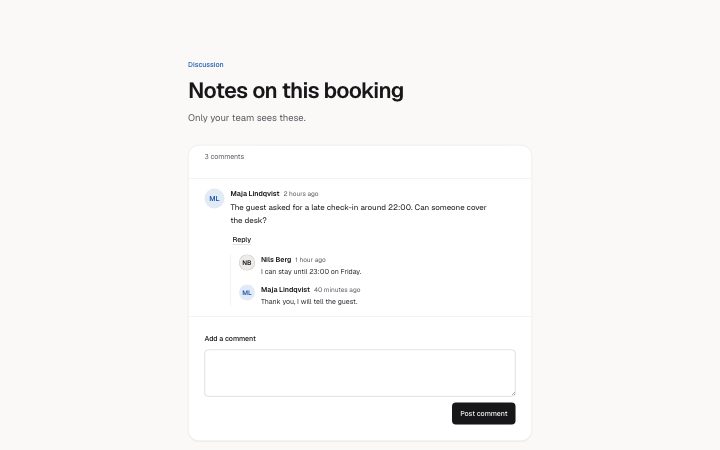
App, comment thread preview

Install

npx shadcn add @klarhimmel/app-comments-thread

Usage

import { Theme } from '@/components/klarhimmel/theme/style';
import { BlockSurface } from '@/components/klarhimmel/blocks/surface';
import AppCommentsThread from '@/components/klarhimmel/blocks/app-comments-thread';

export default function Section() {
  return (
    <Theme theme="brand">
      <BlockSurface>
        <AppCommentsThread props={{
          "eyebrow": "Discussion",
          "title": "Notes on this booking",
          "description": "Only your team sees these.",
          "summaryWord": "comments",
          "comments": [
            {
              "author": "Maja Lindqvist",
              "time": "2 hours ago",
              "body": "The guest asked for a late check-in around 22:00. Can someone cover the desk?",
              "replies": [
                {
                  "author": "Nils Berg",
                  "time": "1 hour ago",
                  "body": "I can stay until 23:00 on Friday."
                },
                {
                  "author": "Maja Lindqvist",
                  "time": "40 minutes ago",
                  "body": "Thank you, I will tell the guest."
                }
              ]
            }
          ],
          "replyLabel": "Reply",
          "replyForm": {
            "label": "Your reply",
            "submit": "Send reply",
            "cancel": "Cancel"
          },
          "composer": {
            "label": "Add a comment",
            "submit": "Post comment",
            "posting": "Posting…",
            "empty": "Write something first."
          },
          "you": "You",
          "justNow": "just now",
          "notices": {
            "posted": "Comment posted.",
            "replied": "Reply posted."
          },
          "state": "filled",
          "messages": {
            "emptyTitle": "No comments yet",
            "emptyBody": "Start the discussion. Your team is notified.",
            "error": "We could not post your comment. Try again."
          }
        }} />
      </BlockSurface>
    </Theme>
  );
}
States

comment thread in 4 forms: filled, empty, posting, error.

  • state: filled

    Discussion

    Notes on this booking

    Only your team sees these.

    3 comments

    1. Maja Lindqvist, 2 hours ago

      Maja Lindqvist2 hours ago

      The guest asked for a late check-in around 22:00. Can someone cover the desk?

      1. Nils Berg1 hour ago

        I can stay until 23:00 on Friday.

      2. Maja Lindqvist40 minutes ago

        Thank you, I will tell the guest.

  • state: empty

    Discussion

    Notes on this booking

    Only your team sees these.

    No comments yet

    Start the discussion. Your team is notified.

  • state: posting

    Discussion

    Notes on this booking

    Only your team sees these.

    3 comments

    1. Maja Lindqvist, 2 hours ago

      Maja Lindqvist2 hours ago

      The guest asked for a late check-in around 22:00. Can someone cover the desk?

      1. Nils Berg1 hour ago

        I can stay until 23:00 on Friday.

      2. Maja Lindqvist40 minutes ago

        Thank you, I will tell the guest.

  • state: error

    Discussion

    Notes on this booking

    Only your team sees these.

    3 comments

    1. Maja Lindqvist, 2 hours ago

      Maja Lindqvist2 hours ago

      The guest asked for a late check-in around 22:00. Can someone cover the desk?

      1. Nils Berg1 hour ago

        I can stay until 23:00 on Friday.

      2. Maja Lindqvist40 minutes ago

        Thank you, I will tell the guest.

Notes

When to use it

A discussion under a record: comments with replies one level deep and a field to write a new one. For a conversation with an assistant use `app-assistant-thread`; for a notification feed use `app-notifications-inbox`.

Writing for it

- Use 1 to 4 top-level comments with up to 3 replies each. Give every comment an author and time so the replies make sense without extra context. - `replyLabel` (20) is followed by the author's name for screen readers, so use just Reply rather than Reply to this comment. - `composer.empty` (80) is shown when someone posts an empty field. Say what to write, not that the field is invalid.

Watch out for

What a person posts lives only in this block and is not saved, and it starts over when the thread props change. Replies cannot be nested further, so a reply form on a reply is not offered.

Usage

The block in a page, with its default content (long lists shortened). Every prop is in the table below.

section.tsx
import { Theme } from '@/components/klarhimmel/theme/style';
import { BlockSurface } from '@/components/klarhimmel/blocks/surface';
import AppCommentsThread from '@/components/klarhimmel/blocks/app-comments-thread';

export default function Section() {
  return (
    <Theme theme="brand">
      <BlockSurface>
        <AppCommentsThread props={{
          "eyebrow": "Discussion",
          "title": "Notes on this booking",
          "description": "Only your team sees these.",
          "summaryWord": "comments",
          "comments": [
            {
              "author": "Maja Lindqvist",
              "time": "2 hours ago",
              "body": "The guest asked for a late check-in around 22:00. Can someone cover the desk?",
              "replies": [
                {
                  "author": "Nils Berg",
                  "time": "1 hour ago",
                  "body": "I can stay until 23:00 on Friday."
                }
              ]
            }
          ],
          "replyLabel": "Reply",
          "replyForm": {
            "label": "Your reply",
            "submit": "Send reply",
            "cancel": "Cancel"
          },
          "composer": {
            "label": "Add a comment",
            "submit": "Post comment",
            "posting": "Posting…",
            "empty": "Write something first."
          },
          "you": "You",
          "justNow": "just now",
          "notices": {
            "posted": "Comment posted.",
            "replied": "Reply posted."
          },
          "state": "filled",
          "messages": {
            "emptyTitle": "No comments yet",
            "emptyBody": "Start the discussion. Your team is notified.",
            "error": "We could not post your comment. Try again."
          }
        }} />
      </BlockSurface>
    </Theme>
  );
}

Props

The type, default and text limit of every prop. On a real page, over-limit text is kept and checkSections flags it (Installation, Check a page before you ship); this live preview shows the default until it fits. The panel above edits all props.

PropTypeDefaultDescription
eyebrowstring'Discussion'Text, up to 60 characters. Optional; empty is not rendered.
titlestring'Notes on this booking'Text, up to 120 characters.
descriptionstring'Only your team sees these.'Text, up to 300 characters. Optional; empty is not rendered.
summaryWordstring'comments'Text, up to 20 characters.
comments{ author, time, body, replies }[]1 itemList of 1 to 4. Each item: author, time, body, replies.
replyLabelstring'Reply'Text, up to 20 characters.
replyForm{ label, submit, cancel }{…}Fields: label, submit, cancel.
composer{ label, submit, posting, empty }{…}Fields: label, submit, posting, empty.
youstring'You'Text, up to 24 characters.
justNowstring'just now'Text, up to 24 characters.
notices{ posted, replied }{…}Fields: posted, replied.
state'filled' | 'empty' | 'posting' | 'error''filled'One of 'filled', 'empty', 'posting', 'error'.
messages{ emptyTitle, emptyBody, error }{…}Fields: emptyTitle, emptyBody, error.
headingLevel'1' | '2'-One of '1', '2'. Optional; empty is not rendered.

Install

Installs

app-comments-thread
Uses
  • Avatar
  • Banner
  • Button
  • Textarea
  • EmptyState
About
A discussion between people: comments with author and time, replies one level deep, a Reply button that opens a form under its comment (focus moves in and back), and a composer.
States
Filled, empty, posting and error. Reply opens a form under its comment and names the author; Escape closes it.