Access detail
Install
npx shadcn add @klarhimmel/app-access-detailUsage
import { Theme } from '@/components/klarhimmel/theme/style';
import { BlockSurface } from '@/components/klarhimmel/blocks/surface';
import AppAccessDetail from '@/components/klarhimmel/blocks/app-access-detail';

export default function Section() {
  return (
    <Theme theme="brand">
      <BlockSurface>
        <AppAccessDetail props={{
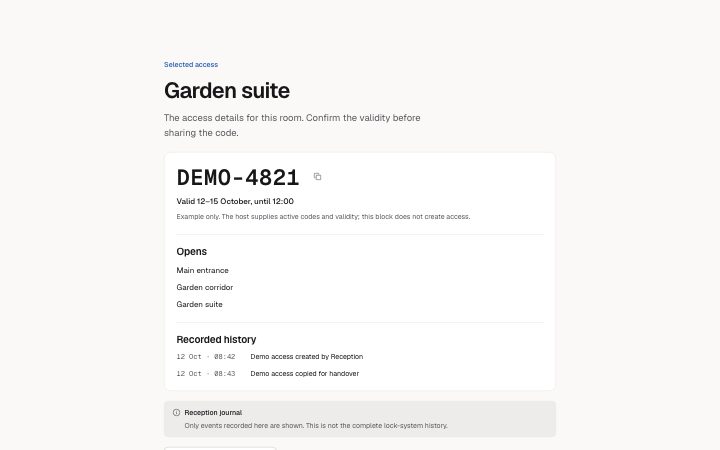
          "eyebrow": "Selected access",
          "title": "Garden suite",
          "description": "The access details for this room. Confirm the validity before sharing the code.",
          "code": "DEMO-4821",
          "copyLabel": "Copy demo access code",
          "validity": "Valid 12–15 October, until 12:00",
          "note": "Example only. The host supplies active codes and validity; this block does not create access.",
          "permissionsTitle": "Opens",
          "permissions": [
            "Main entrance",
            "Garden corridor",
            "Garden suite"
          ],
          "unknownPermissions": "Permissions could not be read. Do not assume access is available.",
          "emptyPermissions": "This code opens no doors.",
          "historyTitle": "Recorded history",
          "history": [
            {
              "time": "12 Oct · 08:42",
              "event": "Demo access created by Reception"
            },
            {
              "time": "12 Oct · 08:43",
              "event": "Demo access copied for handover"
            }
          ],
          "emptyHistory": "No events recorded by this system.",
          "source": "Reception journal",
          "sourceNote": "Only events recorded here are shown. This is not the complete lock-system history.",
          "action": {
            "label": "Review access settings",
            "href": "https://example.com/access"
          }
        }} />
      </BlockSurface>
    </Theme>
  );
}
Notes
When to use it
Inspect one authorized access record with its code, validity, permissions and locally recorded history. Use app-data-table for the list from which the host selects that record.
Writing for it
- Pass only the code the current viewer is authorized to see. Write the validity explicitly, including the end time; this presentation block does not determine whether a credential is active. - Use null permissions when they could not be read, an empty array when no doors are allowed, and a populated array for confirmed access. Keep sourceNote explicit about the history coverage.
Watch out for
The copy affordance only copies the supplied string. It never creates credentials, renews validity or writes a journal event; those operations and their authorization belong in the host application.
Pairs well with
Usage
The block in a page, with its default content (long lists shortened). Every prop is in the table below.
import { Theme } from '@/components/klarhimmel/theme/style';
import { BlockSurface } from '@/components/klarhimmel/blocks/surface';
import AppAccessDetail from '@/components/klarhimmel/blocks/app-access-detail';

export default function Section() {
  return (
    <Theme theme="brand">
      <BlockSurface>
        <AppAccessDetail props={{
          "eyebrow": "Selected access",
          "title": "Garden suite",
          "description": "The access details for this room. Confirm the validity before sharing the code.",
          "code": "DEMO-4821",
          "copyLabel": "Copy demo access code",
          "validity": "Valid 12–15 October, until 12:00",
          "note": "Example only. The host supplies active codes and validity; this block does not create access.",
          "permissionsTitle": "Opens",
          "permissions": [
            "Main entrance",
            "Garden corridor",
            "Garden suite"
          ],
          "unknownPermissions": "Permissions could not be read. Do not assume access is available.",
          "emptyPermissions": "This code opens no doors.",
          "historyTitle": "Recorded history",
          "history": [
            {
              "time": "12 Oct · 08:42",
              "event": "Demo access created by Reception"
            },
            {
              "time": "12 Oct · 08:43",
              "event": "Demo access copied for handover"
            }
          ],
          "emptyHistory": "No events recorded by this system.",
          "source": "Reception journal",
          "sourceNote": "Only events recorded here are shown. This is not the complete lock-system history.",
          "action": {
            "label": "Review access settings",
            "href": "https://example.com/access"
          }
        }} />
      </BlockSurface>
    </Theme>
  );
}
Props
The type, default and text limit of every prop. On a real page, over-limit text is kept and checkSections flags it (Installation, Check a page before you ship); this live preview shows the default until it fits. The panel above edits all props.
| Prop | Type | Default | Description |
|---|---|---|---|
eyebrow | string | 'Selected access' | Text, up to 60 characters. |
title | string | 'Garden suite' | Text, up to 120 characters. |
description | string | 'The access details for this room. C…' | Text, up to 300 characters. |
code | string | 'DEMO-4821' | Text, up to 40 characters. |
copyLabel | string | 'Copy demo access code' | Text, up to 60 characters. |
validity | string | 'Valid 12–15 October, until 12:00' | Text, up to 120 characters. |
note | string | 'Example only. The host supplies act…' | Text, up to 200 characters. |
permissionsTitle | string | 'Opens' | Text, up to 60 characters. |
permissions | string[] | 3 items | See the type. |
unknownPermissions | string | 'Permissions could not be read. Do n…' | Text, up to 160 characters. |
emptyPermissions | string | 'This code opens no doors.' | Text, up to 160 characters. |
historyTitle | string | 'Recorded history' | Text, up to 60 characters. |
history | { time, event }[] | 2 items | List of up to 8. Each item: time, event. |
emptyHistory | string | 'No events recorded by this system.' | Text, up to 160 characters. |
source | string | 'Reception journal' | Text, up to 100 characters. |
sourceNote | string | 'Only events recorded here are shown…' | Text, up to 200 characters. |
action | Link | {…} | See the type. |
headingLevel | '1' | '2' | - | One of '1', '2'. Optional; empty is not rendered. |
Install
Installs
app-access-detail- CopyButton
- SourceNote
- States
- Permissions may be unknown, empty or populated. Only the supplied history is shown. The host supplies active access and validates authorization.