Case study, metrics
Install
npx shadcn add @klarhimmel/case-study-metricsUsage
import { Theme } from '@/components/klarhimmel/theme/style';
import { BlockSurface } from '@/components/klarhimmel/blocks/surface';
import CaseStudyMetrics from '@/components/klarhimmel/blocks/case-study-metrics';

export default function Section() {
  return (
    <Theme theme="brand">
      <BlockSurface>
        <CaseStudyMetrics props={{
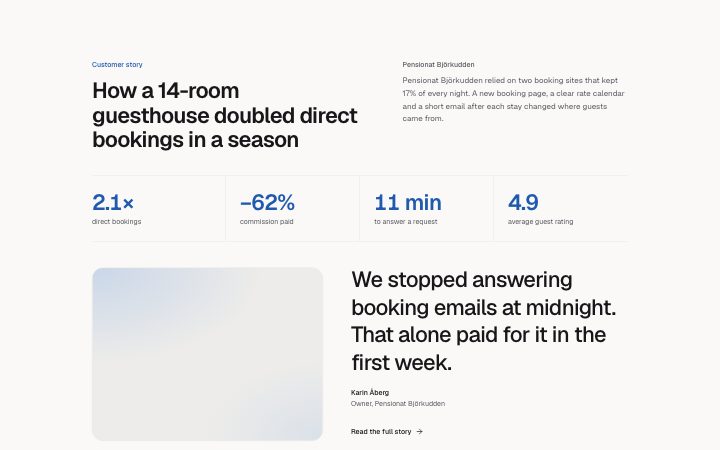
          "eyebrow": "Customer story",
          "client": "Pensionat Björkudden",
          "title": "How a 14-room guesthouse doubled direct bookings in a season",
          "summary": "Pensionat Björkudden relied on two booking sites that kept 17% of every night. A new booking page, a clear rate calendar and a short email after each stay changed where guests came from.",
          "metrics": [
            {
              "value": "2.1×",
              "label": "direct bookings"
            },
            {
              "value": "−62%",
              "label": "commission paid"
            },
            {
              "value": "11 min",
              "label": "to answer a request"
            },
            {
              "value": "4.9",
              "label": "average guest rating"
            }
          ],
          "quote": "We stopped answering booking emails at midnight. That alone paid for it in the first week.",
          "name": "Karin Åberg",
          "role": "Owner, Pensionat Björkudden",
          "media": {
            "src": "",
            "alt": "The guesthouse front garden in late summer"
          },
          "link": {
            "label": "Read the full story",
            "href": "/customers/pensionat-bjorkudden"
          }
        }} />
      </BlockSurface>
    </Theme>
  );
}
Install
Import
import Block from '@/components/klarhimmel/blocks/case-study-metrics';- case-study/metrics
- Category
- One customer story: the problem, the work, the result.
Notes
When to use it
One customer story that opens with its numbers: a row of two to four big metrics, then a quote beside a photo. Pick `case-study-story` when the story has no figures to show, and `case-study-card` for several customers.
Writing for it
- Metric values hold 20 characters, so use '48%' or '2.1 h', not a phrase. The 80 character label under each says what the number counts. - The quote has 320 characters and is set large on wide containers. Take it from the customer and attach the name and the role, both required for the caption. - The summary (400 characters) sits beside the title and is optional, so use it for context the metrics do not give, like the size of the client.
Watch out for
With four metrics the numbers use the smaller title size so they fit, with two or three they are larger. Adding a fourth metric therefore changes how loud the row looks, not only how wide it is.
Pairs well with
Usage
The block in a page, with its default content (long lists shortened). Every prop is in the table below.
import { Theme } from '@/components/klarhimmel/theme/style';
import { BlockSurface } from '@/components/klarhimmel/blocks/surface';
import CaseStudyMetrics from '@/components/klarhimmel/blocks/case-study-metrics';

export default function Section() {
  return (
    <Theme theme="brand">
      <BlockSurface>
        <CaseStudyMetrics props={{
          "eyebrow": "Customer story",
          "client": "Pensionat Björkudden",
          "title": "How a 14-room guesthouse doubled direct bookings in a season",
          "summary": "Pensionat Björkudden relied on two booking sites that kept 17% of every night. A new booking page, a clear rate calendar and a short email after each stay changed where guests came from.",
          "metrics": [
            {
              "value": "2.1×",
              "label": "direct bookings"
            },
            {
              "value": "−62%",
              "label": "commission paid"
            },
            {
              "value": "11 min",
              "label": "to answer a request"
            },
            {
              "value": "4.9",
              "label": "average guest rating"
            }
          ],
          "quote": "We stopped answering booking emails at midnight. That alone paid for it in the first week.",
          "name": "Karin Åberg",
          "role": "Owner, Pensionat Björkudden",
          "media": {
            "src": "",
            "alt": "The guesthouse front garden in late summer"
          },
          "link": {
            "label": "Read the full story",
            "href": "/customers/pensionat-bjorkudden"
          }
        }} />
      </BlockSurface>
    </Theme>
  );
}
Props
The type, default and text limit of every prop. On a real page, over-limit text is kept and checkSections flags it (Installation, Check a page before you ship); this live preview shows the default until it fits. The panel above edits all props.
| Prop | Type | Default | Description |
|---|---|---|---|
eyebrow | string | 'Customer story' | Text, up to 60 characters. |
client | string | 'Pensionat Björkudden' | Text, up to 60 characters. |
title | string | 'How a 14-room guesthouse doubled di…' | Text, up to 140 characters. |
summary | string | 'Pensionat Björkudden relied on two …' | Text, up to 400 characters. |
metrics | { value, label }[] | 4 items | List of 2 to 4. Each item: value, label. |
quote | string | 'We stopped answering booking emails…' | Text, up to 320 characters. |
name | string | 'Karin Åberg' | Text, up to 60 characters. |
role | string | 'Owner, Pensionat Björkudden' | Text, up to 80 characters. |
media | Media | {…} | See the type. |
link | Link | {…} | See the type. |
headingLevel | '1' | '2' | - | One of '1', '2'. Optional; empty is not rendered. |