Case study, before and after
Install
npx shadcn add @klarhimmel/case-study-before-afterUsage
import { Theme } from '@/components/klarhimmel/theme/style';
import { BlockSurface } from '@/components/klarhimmel/blocks/surface';
import CaseStudyBeforeAfter from '@/components/klarhimmel/blocks/case-study-before-after';

export default function Section() {
  return (
    <Theme theme="brand">
      <BlockSurface>
        <CaseStudyBeforeAfter props={{
          "eyebrow": "Case study",
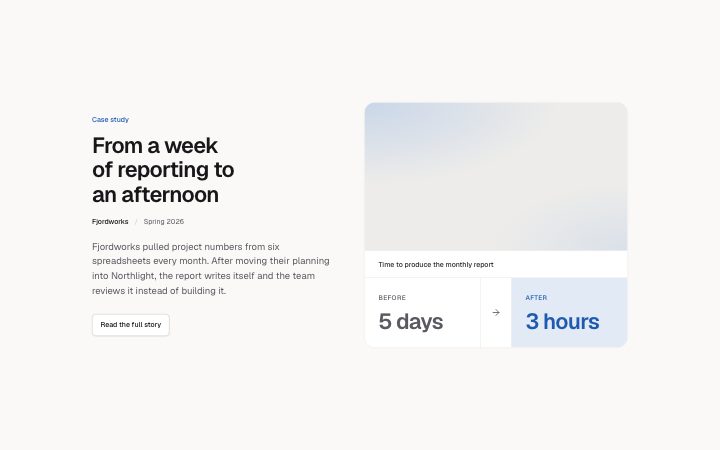
          "title": "From a week of reporting to an afternoon",
          "client": "Fjordworks",
          "date": "Spring 2026",
          "metric": "Time to produce the monthly report",
          "before": {
            "label": "Before",
            "value": "5 days"
          },
          "after": {
            "label": "After",
            "value": "3 hours"
          },
          "summary": "Fjordworks pulled project numbers from six spreadsheets every month. After moving their planning into Northlight, the report writes itself and the team reviews it instead of building it.",
          "link": {
            "label": "Read the full story",
            "href": "#fjordworks"
          },
          "media": {
            "src": "",
            "alt": "The Fjordworks monthly report on a laptop"
          }
        }} />
      </BlockSurface>
    </Theme>
  );
}
Install
Import
import Block from '@/components/klarhimmel/blocks/case-study-before-after';- case-study/before-after
- Category
- One customer story: the problem, the work, the result.
Notes
When to use it
One dated result presented as a single before and after figure with a short story, link and image. For several results at once use `case-study-card`, and for a full story with quote use `case-study-metrics`.
Writing for it
- Keep the metric line within a recommended 48 characters; the schema still accepts 80 for compatibility. Name the measurement, such as 'Median reply time', and leave the fuller result in the story. - For each side, use a label of at most 16 characters and a value of at most 12. These are recommendations, below the existing hard limits of 40 and 24; use matching units and move explanatory sentences into the summary. - The summary has 300 characters for what changed and over how long. Set showComparison to false when a comparison does not help the case; only the image remains in the right column.
Watch out for
The after figure is drawn in the accent colour and the before figure in muted grey, and the arrow between them is decorative. Do not swap them to show a decrease you want to look good, because the layout always reads as a positive step.
Pairs well with
Usage
The block in a page, with its default content (long lists shortened). Every prop is in the table below.
import { Theme } from '@/components/klarhimmel/theme/style';
import { BlockSurface } from '@/components/klarhimmel/blocks/surface';
import CaseStudyBeforeAfter from '@/components/klarhimmel/blocks/case-study-before-after';

export default function Section() {
  return (
    <Theme theme="brand">
      <BlockSurface>
        <CaseStudyBeforeAfter props={{
          "eyebrow": "Case study",
          "title": "From a week of reporting to an afternoon",
          "client": "Fjordworks",
          "date": "Spring 2026",
          "metric": "Time to produce the monthly report",
          "before": {
            "label": "Before",
            "value": "5 days"
          },
          "after": {
            "label": "After",
            "value": "3 hours"
          },
          "summary": "Fjordworks pulled project numbers from six spreadsheets every month. After moving their planning into Northlight, the report writes itself and the team reviews it instead of building it.",
          "link": {
            "label": "Read the full story",
            "href": "#fjordworks"
          },
          "media": {
            "src": "",
            "alt": "The Fjordworks monthly report on a laptop"
          }
        }} />
      </BlockSurface>
    </Theme>
  );
}
Props
The type, default and text limit of every prop. On a real page, over-limit text is kept and checkSections flags it (Installation, Check a page before you ship); this live preview shows the default until it fits. The panel above edits all props.
| Prop | Type | Default | Description |
|---|---|---|---|
eyebrow | string | 'Case study' | Text, up to 60 characters. |
title | string | 'From a week of reporting to an afte…' | Text, up to 120 characters. |
client | string | 'Fjordworks' | Text, up to 60 characters. |
date | string | 'Spring 2026' | Text, up to 30 characters. |
metric | string | 'Time to produce the monthly report' | Recommended maximum: 48 characters. Name the measurement, not the whole result. Text, up to 80 characters. |
showComparison | boolean | - | Show the metric and before/after strip. Defaults to true; false leaves only the illustration. Optional; empty is not rendered. |
before | { label, value } | {…} | Recommended: label at most 16 characters and value at most 12. Put context in the summary. Fields: label, value. |
after | { label, value } | {…} | Recommended: label at most 16 characters and value at most 12. Put context in the summary. Fields: label, value. |
summary | string | 'Fjordworks pulled project numbers f…' | Text, up to 300 characters. |
link | Link | {…} | See the type. |
media | Media | {…} | See the type. |
headingLevel | '1' | '2' | - | One of '1', '2'. Optional; empty is not rendered. |