Month calendar
Install
npx shadcn add @klarhimmel/app-scheduling-calendarUsage
import { Theme } from '@/components/klarhimmel/theme/style';
import { BlockSurface } from '@/components/klarhimmel/blocks/surface';
import AppSchedulingCalendar from '@/components/klarhimmel/blocks/app-scheduling-calendar';

export default function Section() {
  return (
    <Theme theme="brand">
      <BlockSurface>
        <AppSchedulingCalendar props={{
          "eyebrow": "Events at Exempelhotellet",
          "title": "What is on this month",
          "description": "Weddings, conferences and the weekend packages that fill the hotel.",
          "month": "2026-11",
          "today": "2026-11-16",
          "locale": "en",
          "firstDay": "mon",
          "weekdays": [
            "Mon",
            "Tue",
            "Wed",
            "Thu",
            "Fri",
            "Sat",
            "Sun"
          ],
          "events": [
            {
              "date": "2026-11-04",
              "time": "10:00",
              "title": "Site visit, Berg wedding"
            },
            {
              "date": "2026-11-13",
              "time": "14:00",
              "title": "Chef tasting menu"
            },
            {
              "date": "2026-11-14",
              "time": "16:00",
              "title": "Berg wedding"
            },
            {
              "date": "2026-11-14",
              "time": "09:00",
              "title": "Florist delivery"
            },
            {
              "date": "2026-11-14",
              "time": "12:00",
              "title": "Room set-up, garden hall"
            },
            {
              "date": "2026-11-14",
              "time": "19:00",
              "title": "Late check-ins"
            },
            {
              "date": "2026-11-18",
              "time": "09:30",
              "title": "Staff meeting"
            },
            {
              "date": "2026-11-25",
              "time": "13:00",
              "title": "Conference: Northlight Days"
            },
            {
              "date": "2026-11-26",
              "title": "Conference: Northlight Days"
            }
          ],
          "previous": "Previous month",
          "next": "Next month",
          "todayLabel": "Today",
          "at": "at",
          "state": "filled",
          "messages": {
            "empty": "Nothing is planned this month.",
            "loading": "Loading events…",
            "error": "We could not load the events.",
            "retry": "Try again",
            "invalid": "These dates could not be read, so they are not shown:"
          }
        }} />
      </BlockSurface>
    </Theme>
  );
}
States
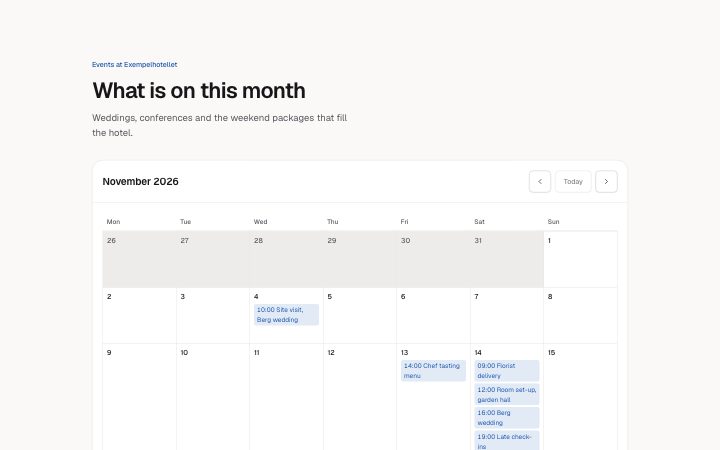
month calendar in 4 forms: filled, empty, loading, error.
state: filled
Events at Exempelhotellet
What is on this month
Weddings, conferences and the weekend packages that fill the hotel.
November 2026
November 2026
These dates could not be read, so they are not shown:Nothing is planned this month.
Loading events…
We could not load the events.November 2026 Mon Tue Wed Thu Fri Sat Sun - 10:00 Site visit, Berg wedding
- 14:00 Chef tasting menu
- 09:00 Florist delivery
- 12:00 Room set-up, garden hall
- 16:00 Berg wedding
- 19:00 Late check-ins
Today- 09:30 Staff meeting
- 13:00 Conference: Northlight Days
- Conference: Northlight Days
- at 10:00: Site visit, Berg wedding
- at 14:00: Chef tasting menu
- at 09:00: Florist delivery
- at 12:00: Room set-up, garden hall
- at 16:00: Berg wedding
- at 19:00: Late check-ins
Today
- at 09:30: Staff meeting
- at 13:00: Conference: Northlight Days
- Conference: Northlight Days
state: empty
Events at Exempelhotellet
What is on this month
Weddings, conferences and the weekend packages that fill the hotel.
November 2026
November 2026
These dates could not be read, so they are not shown:Nothing is planned this month.
Loading events…
We could not load the events.November 2026 Mon Tue Wed Thu Fri Sat Sun TodayToday
state: loading
Events at Exempelhotellet
What is on this month
Weddings, conferences and the weekend packages that fill the hotel.
November 2026
November 2026
These dates could not be read, so they are not shown:Nothing is planned this month.
Loading events…
We could not load the events.November 2026 Mon Tue Wed Thu Fri Sat Sun TodayToday
state: error
Events at Exempelhotellet
What is on this month
Weddings, conferences and the weekend packages that fill the hotel.
November 2026
November 2026
These dates could not be read, so they are not shown:Nothing is planned this month.
Loading events…
We could not load the events.November 2026 Mon Tue Wed Thu Fri Sat Sun TodayToday
Notes
When to use it
A month view with events, for showing what is planned and not for booking. To let someone choose a time, use `app-scheduling-slots`. In narrow containers the grid turns into an agenda list, so it also works in a side column.
Writing for it
- Dates are plain ISO text: month as 2026-11, today as 2026-11-16 and each event date as 2026-11-04. The block never reads the clock, so you must set today yourself. - weekdays needs exactly seven names starting from the day firstDay picks, and locale (10) sets the language of the month names. Change all three together for another language. - Event titles hold 60 characters and the time is optional at 12. An event without a time shows only its title in the cell.
Watch out for
A date that cannot be read, like 2026-13, is not dropped silently: it is listed under messages.invalid so you can fix it. Up to 40 events are allowed, and a month without events shows the empty message even when the state is filled.
Usage
The block in a page, with its default content (long lists shortened). Every prop is in the table below.
import { Theme } from '@/components/klarhimmel/theme/style';
import { BlockSurface } from '@/components/klarhimmel/blocks/surface';
import AppSchedulingCalendar from '@/components/klarhimmel/blocks/app-scheduling-calendar';

export default function Section() {
  return (
    <Theme theme="brand">
      <BlockSurface>
        <AppSchedulingCalendar props={{
          "eyebrow": "Events at Exempelhotellet",
          "title": "What is on this month",
          "description": "Weddings, conferences and the weekend packages that fill the hotel.",
          "month": "2026-11",
          "today": "2026-11-16",
          "locale": "en",
          "firstDay": "mon",
          "weekdays": [
            "Mon",
            "Tue",
            "Wed"
          ],
          "events": [
            {
              "date": "2026-11-04",
              "time": "10:00",
              "title": "Site visit, Berg wedding"
            },
            {
              "date": "2026-11-13",
              "time": "14:00",
              "title": "Chef tasting menu"
            },
            {
              "date": "2026-11-14",
              "time": "16:00",
              "title": "Berg wedding"
            }
          ],
          "previous": "Previous month",
          "next": "Next month",
          "todayLabel": "Today",
          "at": "at",
          "state": "filled",
          "messages": {
            "empty": "Nothing is planned this month.",
            "loading": "Loading events…",
            "error": "We could not load the events.",
            "retry": "Try again",
            "invalid": "These dates could not be read, so they are not shown:"
          }
        }} />
      </BlockSurface>
    </Theme>
  );
}
Props
month, today and locale are plain text (ISO dates and a language tag), because a block never reads the clock. events are dated lines; weekdays, firstDay and the button labels are the calendar chrome.
| Prop | Type | Default | Description |
|---|---|---|---|
eyebrow | string | 'Events at Exempelhotellet' | Text, up to 60 characters. Optional; empty is not rendered. |
title | string | 'What is on this month' | Text, up to 120 characters. |
description | string | 'Weddings, conferences and the weeke…' | Text, up to 300 characters. Optional; empty is not rendered. |
month | string | '2026-11' | Text, up to 7 characters. |
today | string | '2026-11-16' | Text, up to 10 characters. |
locale | string | 'en' | Text, up to 10 characters. |
firstDay | 'mon' | 'sun' | 'mon' | One of 'mon', 'sun'. |
weekdays | string[] | 7 items | List of 7 to 7. |
events | { date, time, title }[] | 9 items | List of up to 40. Each item: date, time (optional), title. |
previous | string | 'Previous month' | Text, up to 30 characters. |
next | string | 'Next month' | Text, up to 30 characters. |
todayLabel | string | 'Today' | Text, up to 20 characters. |
at | string | 'at' | Text, up to 10 characters. |
state | 'filled' | 'empty' | 'loading' | 'error' | 'filled' | One of 'filled', 'empty', 'loading', 'error'. |
messages | { empty, loading, error, retry, invalid } | {…} | Fields: empty, loading, error, retry, invalid. |
headingLevel | '1' | '2' | - | One of '1', '2'. Optional; empty is not rendered. |
Install
Installs
app-scheduling-calendar- Button
- IconButton
- About
- A month as a table with its events, today marked in words, previous, next and today buttons, and an agenda list in narrow containers instead of a cramped grid. Filled, empty, loading and error states.
- States
- Filled, empty, loading, error. Today is marked in words; an agenda replaces the grid in narrow containers.