FAQ, list
Install
npx shadcn add @klarhimmel/faq-listUsage
import { Theme } from '@/components/klarhimmel/theme/style';
import { BlockSurface } from '@/components/klarhimmel/blocks/surface';
import FaqList from '@/components/klarhimmel/blocks/faq-list';

export default function Section() {
  return (
    <Theme theme="brand">
      <BlockSurface>
        <FaqList props={{
          "eyebrow": "FAQ",
          "title": "Questions, answered",
          "description": "Cannot find what you are looking for? Write to us and a person will reply.",
          "items": [
            {
              "question": "Is there a free plan?",
              "answer": "Yes. The Starter plan is free for as long as you like, with up to three projects and two team members."
            },
            {
              "question": "Can I change plans later?",
              "answer": "You can upgrade or downgrade at any time. Changes apply from the next billing period and we prorate upgrades."
            },
            {
              "question": "How is my data protected?",
              "answer": "Data is encrypted in transit and at rest, backed up daily and never used to train models. Business plans add audit logs and single sign-on."
            },
            {
              "question": "Can I import from another tool?",
              "answer": "Yes. You can import projects and tasks from a CSV file or from most popular project tools in a few minutes."
            },
            {
              "question": "Do you offer discounts for non-profits?",
              "answer": "We give registered non-profits and schools 50% off any paid plan. Contact us with your details."
            }
          ]
        }} />
      </BlockSurface>
    </Theme>
  );
}
Install
Import
import Block from '@/components/klarhimmel/blocks/faq-list';- faq/accordion
- Category
- The questions people ask before they buy.
Notes
When to use it
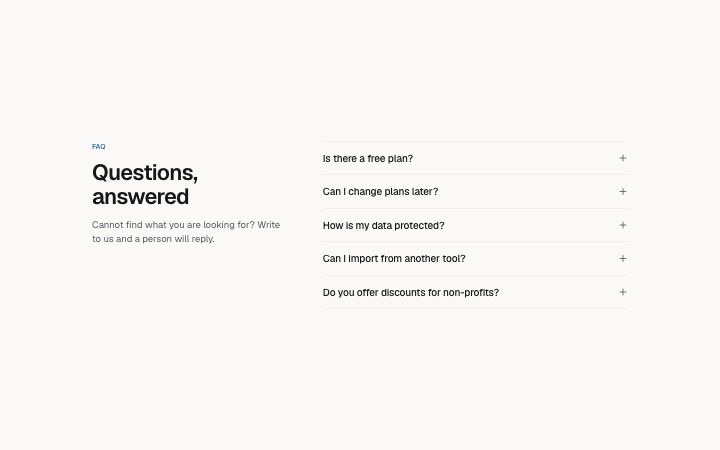
The default FAQ: heading on the left, an accordion of up to ten questions on the right, with hairline dividers. Pick `faq-centered` when you have only a few questions and want a softer look, or `faq-support` when a human contact should sit beside them.
Writing for it
- The left column carries the eyebrow, title and description (300), so use the description to say who answers if the list falls short. - A question holds 140 characters; keep each to one line so the plus icon on the right stays aligned with the text. - With a minimum of one item and a ceiling of ten, you can start with a single entry, but a lone accordion row reads as a mistake. Start from three.
Watch out for
Answers are native details elements, so they are closed until clicked and search-in-page may not find text inside them in every browser. Anything a buyer must see before paying belongs in the page copy, not only here.
Pairs well with
Usage
The block in a page, with its default content (long lists shortened). Every prop is in the table below.
import { Theme } from '@/components/klarhimmel/theme/style';
import { BlockSurface } from '@/components/klarhimmel/blocks/surface';
import FaqList from '@/components/klarhimmel/blocks/faq-list';

export default function Section() {
  return (
    <Theme theme="brand">
      <BlockSurface>
        <FaqList props={{
          "eyebrow": "FAQ",
          "title": "Questions, answered",
          "description": "Cannot find what you are looking for? Write to us and a person will reply.",
          "items": [
            {
              "question": "Is there a free plan?",
              "answer": "Yes. The Starter plan is free for as long as you like, with up to three projects and two team members."
            },
            {
              "question": "Can I change plans later?",
              "answer": "You can upgrade or downgrade at any time. Changes apply from the next billing period and we prorate upgrades."
            },
            {
              "question": "How is my data protected?",
              "answer": "Data is encrypted in transit and at rest, backed up daily and never used to train models. Business plans add audit logs and single sign-on."
            },
            {
              "question": "Can I import from another tool?",
              "answer": "Yes. You can import projects and tasks from a CSV file or from most popular project tools in a few minutes."
            },
            {
              "question": "Do you offer discounts for non-profits?",
              "answer": "We give registered non-profits and schools 50% off any paid plan. Contact us with your details."
            }
          ]
        }} />
      </BlockSurface>
    </Theme>
  );
}
Props
The type, default and text limit of every prop. On a real page, over-limit text is kept and checkSections flags it (Installation, Check a page before you ship); this live preview shows the default until it fits. The panel above edits all props.
| Prop | Type | Default | Description |
|---|---|---|---|
eyebrow | string | 'FAQ' | Text, up to 60 characters. |
title | string | 'Questions, answered' | Text, up to 120 characters. |
description | string | 'Cannot find what you are looking fo…' | Text, up to 300 characters. |
items | { question, answer }[] | 5 items | List of 1 to 10. Each item: question, answer. |
headingLevel | '1' | '2' | - | One of '1', '2'. Optional; empty is not rendered. |