Steps, numbered
Install
npx shadcn add @klarhimmel/steps-numberedUsage
import { Theme } from '@/components/klarhimmel/theme/style';
import { BlockSurface } from '@/components/klarhimmel/blocks/surface';
import StepsNumbered from '@/components/klarhimmel/blocks/steps-numbered';

export default function Section() {
  return (
    <Theme theme="brand">
      <BlockSurface>
        <StepsNumbered props={{
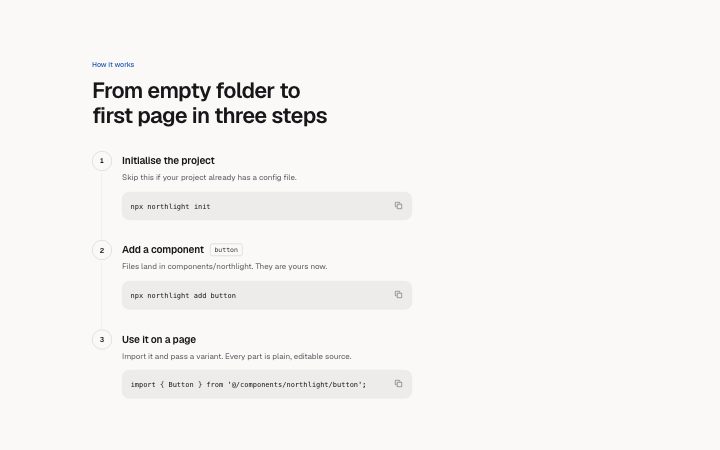
          "eyebrow": "How it works",
          "title": "From empty folder to first page in three steps",
          "description": "",
          "layout": "list",
          "items": [
            {
              "title": "Initialise the project",
              "description": "Skip this if your project already has a config file.",
              "meta": "",
              "code": "npx northlight init"
            },
            {
              "title": "Add a component",
              "description": "Files land in components/northlight. They are yours now.",
              "meta": "button",
              "code": "npx northlight add button"
            },
            {
              "title": "Use it on a page",
              "description": "Import it and pass a variant. Every part is plain, editable source.",
              "meta": "",
              "code": "import { Button } from '@/components/northlight/button';"
            }
          ]
        }} />
      </BlockSurface>
    </Theme>
  );
}
Install
Import
import Block from '@/components/klarhimmel/blocks/steps-numbered';- steps/numbered
- Category
- How it works, in numbered steps or a timeline.
Notes
When to use it
A numbered list of one to ten steps, either as cards in a grid or as a vertical list, where a step can also carry a small reference chip or a copyable code block. It is the pick for setup and install guides; use `steps-timeline` for a story over time.
Writing for it
- The code field takes up to 400 characters and is drawn as a copyable snippet inside the step. Put a single command or short config there, not a file. - The meta field (60 characters) becomes a small chip beside the title, good for a duration like '5 min' or a tool name. - Choose layout 'cards' for steps that stand alone and 'list' for steps that must be followed in order, because the list draws a connecting line between the numbers.
Watch out for
When eyebrow, title and description are all empty the section heading is dropped and the step titles are drawn as h2 instead of h3. That keeps the outline correct, but it also means the block then has no heading of its own to label the section.
Usage
The block in a page, with its default content (long lists shortened). Every prop is in the table below.
import { Theme } from '@/components/klarhimmel/theme/style';
import { BlockSurface } from '@/components/klarhimmel/blocks/surface';
import StepsNumbered from '@/components/klarhimmel/blocks/steps-numbered';

export default function Section() {
  return (
    <Theme theme="brand">
      <BlockSurface>
        <StepsNumbered props={{
          "eyebrow": "How it works",
          "title": "From empty folder to first page in three steps",
          "description": "",
          "layout": "list",
          "items": [
            {
              "title": "Initialise the project",
              "description": "Skip this if your project already has a config file.",
              "meta": "",
              "code": "npx northlight init"
            },
            {
              "title": "Add a component",
              "description": "Files land in components/northlight. They are yours now.",
              "meta": "button",
              "code": "npx northlight add button"
            },
            {
              "title": "Use it on a page",
              "description": "Import it and pass a variant. Every part is plain, editable source.",
              "meta": "",
              "code": "import { Button } from '@/components/northlight/button';"
            }
          ]
        }} />
      </BlockSurface>
    </Theme>
  );
}
Props
The type, default and text limit of every prop. On a real page, over-limit text is kept and checkSections flags it (Installation, Check a page before you ship); this live preview shows the default until it fits. The panel above edits all props.
| Prop | Type | Default | Description |
|---|---|---|---|
eyebrow | string | 'How it works' | Text, up to 60 characters. |
title | string | 'From empty folder to first page in …' | Text, up to 120 characters. |
description | string | '' | Text, up to 300 characters. |
layout | 'cards' | 'list' | 'list' | One of 'cards', 'list'. |
items | { title, description, meta, code }[] | 3 items | List of 1 to 10. Each item: title, description, meta, code. |
headingLevel | '1' | '2' | - | One of '1', '2'. Optional; empty is not rendered. |