SaaS
A landing page for a software product: what it does, who uses it, how it works, what it costs and the questions people ask before they sign up.
npx shadcn add @klarhimmel/template-saas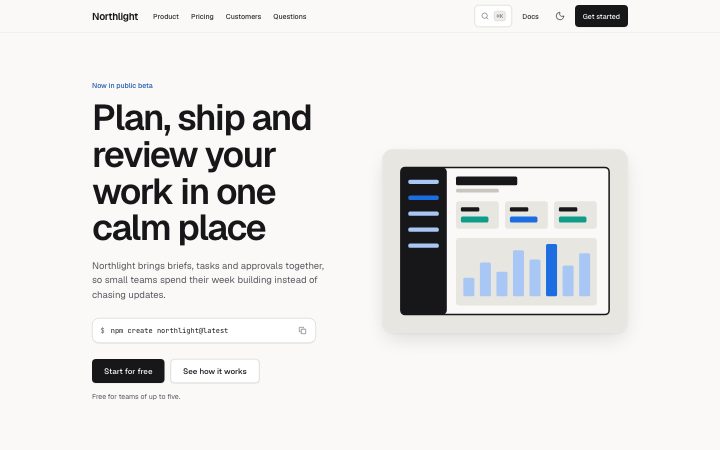
Install
npx shadcn add @klarhimmel/template-saasThe page
10 sections, in order
Each section is one block with this template's own copy. The anchor is the id in-page links point at.
| Anchor | Block | Content |
|---|---|---|
#top | header/simple | Northlight |
#hero | hero/split | Plan, ship and review your work in one calm place |
#clients | logo-cloud/row | Trusted by teams who care about craft |
#features | features/grid | Everything a small team needs, nothing it does not |
#numbers | stats/row | Small numbers that add up |
#reviews | testimonials/grid | People notice the difference in the first week |
#pricing | pricing/tiers | Simple plans that grow with your team |
#faq | faq/accordion | Questions, answered |
#start | cta/banner | Ready to bring calm to your week? |
#footer | footer/link-columns | Northlight |
Install
CLI
npx shadcn add @klarhimmel/template-saaspnpm
pnpm dlx shadcn@latest add @klarhimmel/template-saas- Klarhimmel
- Geist / Geist
- radius 8
- Needs
- React 19, Tailwind CSS v4 and the theme import. The page and every block it uses land under components/klarhimmel/.
Before you ship
Wire these before shipping
The template is a finished page with placeholder wiring. These are yours to connect.
Links
`#section` links jump within the page. Links to https://example.com are placeholders: point them at your own pages.
Images
The illustrations ship with the template (public/klarhimmel/art/saas/). They are artwork, not photographs: replace the `media.src` values with your own.
Forms
Set `action` on the footer newsletter (it is `/replace-with-your-endpoint` now). With `method: 'post'` the form submits natively, with no JavaScript. The live demo never submits.
Style
Uses the default Klarhimmel palette, Geist fonts, radius and spacing. Import theme.css after Tailwind.