One-time code
Install
npx shadcn add @klarhimmel/app-auth-codeUsage
import { Theme } from '@/components/klarhimmel/theme/style';
import { BlockSurface } from '@/components/klarhimmel/blocks/surface';
import AppAuthCode from '@/components/klarhimmel/blocks/app-auth-code';

export default function Section() {
  return (
    <Theme theme="brand">
      <BlockSurface>
        <AppAuthCode props={{
          "eyebrow": "Exempelhotellet",
          "title": "Check your email",
          "description": "We sent a six-digit code to your address. It works for ten minutes.",
          "codeLabel": "Verification code",
          "digitLabel": "Digit",
          "of": "of",
          "submit": "Verify",
          "verifying": "Verifying…",
          "resend": "Send a new code",
          "state": "idle",
          "messages": {
            "error": "That code is not right or has expired. Check it or ask for a new one.",
            "resent": "A new code is on its way."
          }
        }} />
      </BlockSurface>
    </Theme>
  );
}
States
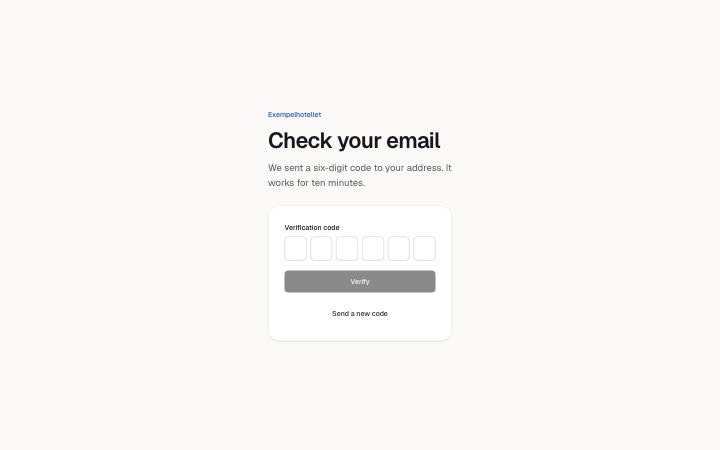
one-time code in 4 forms: idle, verifying, error, resent.
state: idle
Exempelhotellet
Check your email
We sent a six-digit code to your address. It works for ten minutes.
state: verifying
Exempelhotellet
Check your email
We sent a six-digit code to your address. It works for ten minutes.
state: error
Exempelhotellet
Check your email
We sent a six-digit code to your address. It works for ten minutes.
state: resent
Exempelhotellet
Check your email
We sent a six-digit code to your address. It works for ten minutes.
Notes
When to use it
The step after sign-in or sign-up where someone types a six-digit code from an email or text. For choosing a new password use `app-auth-reset`; for the first sign-in step use `app-auth-signin`.
Writing for it
- `codeLabel` (40 characters) names the group of boxes, and each box is read as `digitLabel`, its number, `of` and 6. Keep `digitLabel` to a single word such as Digit. - The `description` (300) is the place to say where the code was sent and how long it lasts; the box count is fixed at six, so do not promise any other length. - Write `messages.error` and `messages.resent` as full sentences up to 120 characters. The resent text appears after someone presses the resend button, even when the state prop is idle.
Watch out for
Nothing is sent unless the host gives the block an `action` or handles the submit, because it behaves as a form with optional method, hidden fields and captcha. While the state is verifying the boxes are read-only, so a stuck verifying state locks people out.
Pairs well with
Usage
The block in a page, with its default content (long lists shortened). Every prop is in the table below.
import { Theme } from '@/components/klarhimmel/theme/style';
import { BlockSurface } from '@/components/klarhimmel/blocks/surface';
import AppAuthCode from '@/components/klarhimmel/blocks/app-auth-code';

export default function Section() {
  return (
    <Theme theme="brand">
      <BlockSurface>
        <AppAuthCode props={{
          "eyebrow": "Exempelhotellet",
          "title": "Check your email",
          "description": "We sent a six-digit code to your address. It works for ten minutes.",
          "codeLabel": "Verification code",
          "digitLabel": "Digit",
          "of": "of",
          "submit": "Verify",
          "verifying": "Verifying…",
          "resend": "Send a new code",
          "state": "idle",
          "messages": {
            "error": "That code is not right or has expired. Check it or ask for a new one.",
            "resent": "A new code is on its way."
          }
        }} />
      </BlockSurface>
    </Theme>
  );
}
Props
The code is always six digits. codeLabel names the group, digitLabel and of name each box ("Digit 1 of 6"); state sets verifying, error and resent.
| Prop | Type | Default | Description |
|---|---|---|---|
eyebrow | string | 'Exempelhotellet' | Text, up to 60 characters. Optional; empty is not rendered. |
title | string | 'Check your email' | Text, up to 120 characters. |
description | string | 'We sent a six-digit code to your ad…' | Text, up to 300 characters. Optional; empty is not rendered. |
codeLabel | string | 'Verification code' | Text, up to 40 characters. |
digitLabel | string | 'Digit' | Text, up to 20 characters. |
of | string | 'of' | Text, up to 10 characters. |
submit | string | 'Verify' | Text, up to 30 characters. |
verifying | string | 'Verifying…' | Text, up to 30 characters. |
resend | string | 'Send a new code' | Text, up to 30 characters. |
state | 'idle' | 'verifying' | 'error' | 'resent' | 'idle' | One of 'idle', 'verifying', 'error', 'resent'. |
messages | { error, resent } | {…} | Fields: error, resent. |
action | string | - | Text, up to 300 characters. Optional; empty is not rendered. |
method | 'post' | 'get' | - | One of 'post', 'get'. Optional; empty is not rendered. |
hidden | { } | - | Optional; empty is not rendered. |
captcha | boolean | - | Optional; empty is not rendered. |
captchaSitekey | string | - | Text, up to 100 characters. Optional; empty is not rendered. |
headingLevel | '1' | '2' | - | One of '1', '2'. Optional; empty is not rendered. |
Install
Installs
app-auth-code- Banner
- Button
- About
- Enter a six-digit code: six boxes that behave as one field. Typing moves forward, Backspace moves back, arrow keys move, pasting fills every box, and the first box asks for the one-time code autofill.
- States
- Idle, verifying, error, resent. Six boxes act as one: paste, Backspace and arrow keys work.