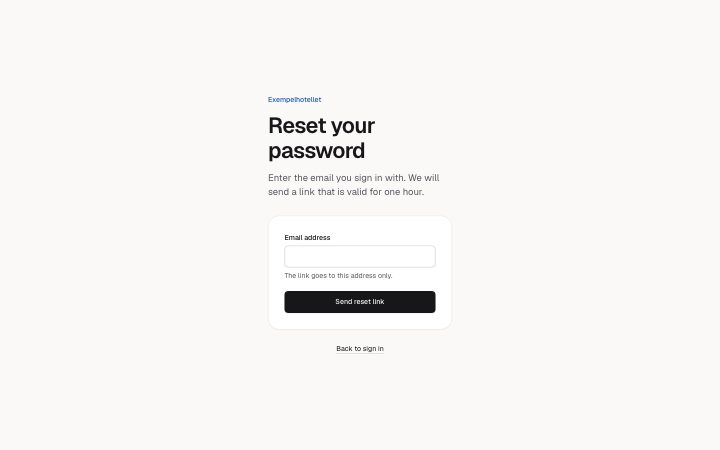
App, reset password
Install
npx shadcn add @klarhimmel/app-auth-resetUsage
import { Theme } from '@/components/klarhimmel/theme/style';
import { BlockSurface } from '@/components/klarhimmel/blocks/surface';
import AppAuthReset from '@/components/klarhimmel/blocks/app-auth-reset';

export default function Section() {
  return (
    <Theme theme="brand">
      <BlockSurface>
        <AppAuthReset props={{
          "eyebrow": "Exempelhotellet",
          "title": "Reset your password",
          "description": "Enter the email you sign in with. We will send a link that is valid for one hour.",
          "emailLabel": "Email address",
          "emailHint": "The link goes to this address only.",
          "submit": "Send reset link",
          "sending": "Sending…",
          "resend": "Send it again",
          "back": {
            "label": "Back to sign in",
            "href": "#sign-in"
          },
          "state": "idle",
          "messages": {
            "sent": "If that address has an account, a link is on its way. Check your inbox and your spam folder.",
            "error": "We could not send the email. Try again in a moment.",
            "emailError": "Enter an email address like name@example.com."
          }
        }} />
      </BlockSurface>
    </Theme>
  );
}
Install
Import
import Block from '@/components/klarhimmel/blocks/app-auth-reset';- app/auth-reset
- About
- Ask for a password reset link: one email field, a send button, a confirmation that does not reveal whether the address has an account, a resend button, and idle, sending, sent and error states.
- Category
- Interface sections for signed-in products.
Notes
When to use it
A single-field page for asking for a password reset link. For entering an emailed code use `app-auth-code`; for a returning user with a password use `app-auth-signin`.
Writing for it
- Write `messages.sent` (160 characters) so it does not say whether the address has an account, for example that a link is on its way if the address is registered. - `emailHint` (120) is optional helper text under the field; use it for the address format or which address to use, not for instructions about the whole flow. - The `back` link is the way out to the sign-in page. Give it a label that names the destination, since it is the only other control on the page.
Watch out for
After the state becomes sent, the same button turns into the `resend` action and skips browser validation, and each press repeats the confirmation. `resend` is required, so an emptied label is not allowed even though it only appears in the sent state.
Pairs well with
Usage
The block in a page, with its default content (long lists shortened). Every prop is in the table below.
import { Theme } from '@/components/klarhimmel/theme/style';
import { BlockSurface } from '@/components/klarhimmel/blocks/surface';
import AppAuthReset from '@/components/klarhimmel/blocks/app-auth-reset';

export default function Section() {
  return (
    <Theme theme="brand">
      <BlockSurface>
        <AppAuthReset props={{
          "eyebrow": "Exempelhotellet",
          "title": "Reset your password",
          "description": "Enter the email you sign in with. We will send a link that is valid for one hour.",
          "emailLabel": "Email address",
          "emailHint": "The link goes to this address only.",
          "submit": "Send reset link",
          "sending": "Sending…",
          "resend": "Send it again",
          "back": {
            "label": "Back to sign in",
            "href": "#sign-in"
          },
          "state": "idle",
          "messages": {
            "sent": "If that address has an account, a link is on its way. Check your inbox and your spam folder.",
            "error": "We could not send the email. Try again in a moment.",
            "emailError": "Enter an email address like name@example.com."
          }
        }} />
      </BlockSurface>
    </Theme>
  );
}
Props
The type, default and text limit of every prop. On a real page, over-limit text is kept and checkSections flags it (Installation, Check a page before you ship); this live preview shows the default until it fits. The panel above edits all props.
| Prop | Type | Default | Description |
|---|---|---|---|
eyebrow | string | 'Exempelhotellet' | Text, up to 60 characters. Optional; empty is not rendered. |
title | string | 'Reset your password' | Text, up to 120 characters. |
description | string | 'Enter the email you sign in with. W…' | Text, up to 300 characters. Optional; empty is not rendered. |
emailLabel | string | 'Email address' | Text, up to 40 characters. |
emailHint | string | 'The link goes to this address only.' | Text, up to 120 characters. Optional; empty is not rendered. |
submit | string | 'Send reset link' | Text, up to 30 characters. |
sending | string | 'Sending…' | Text, up to 30 characters. |
resend | string | 'Send it again' | Text, up to 30 characters. |
back | Link | {…} | See the type. |
state | 'idle' | 'sending' | 'sent' | 'error' | 'idle' | One of 'idle', 'sending', 'sent', 'error'. |
messages | { sent, error, emailError } | {…} | Fields: sent, error, emailError. |
action | string | - | Text, up to 300 characters. Optional; empty is not rendered. |
method | 'post' | 'get' | - | One of 'post', 'get'. Optional; empty is not rendered. |
hidden | { } | - | Optional; empty is not rendered. |
captcha | boolean | - | Optional; empty is not rendered. |
captchaSitekey | string | - | Text, up to 100 characters. Optional; empty is not rendered. |
headingLevel | '1' | '2' | - | One of '1', '2'. Optional; empty is not rendered. |