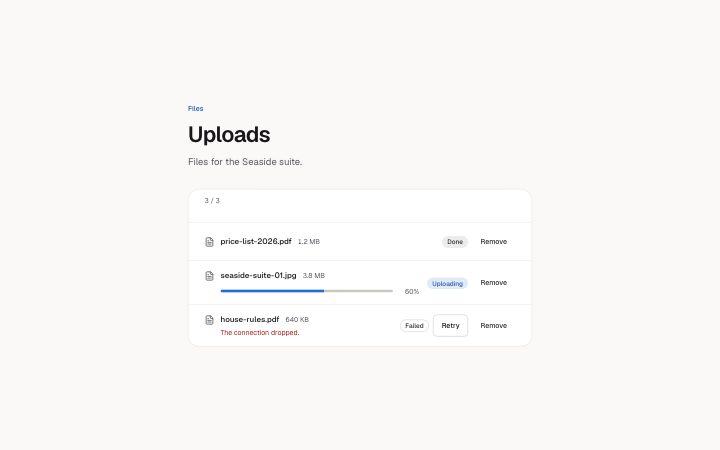
File list with status
Install
npx shadcn add @klarhimmel/app-files-listUsage
import { Theme } from '@/components/klarhimmel/theme/style';
import { BlockSurface } from '@/components/klarhimmel/blocks/surface';
import AppFilesList from '@/components/klarhimmel/blocks/app-files-list';

export default function Section() {
  return (
    <Theme theme="brand">
      <BlockSurface>
        <AppFilesList props={{
          "eyebrow": "Files",
          "title": "Uploads",
          "description": "Files for the Seaside suite.",
          "files": [
            {
              "name": "price-list-2026.pdf",
              "size": "1.2 MB",
              "status": "done",
              "percent": "100"
            },
            {
              "name": "seaside-suite-01.jpg",
              "size": "3.8 MB",
              "status": "uploading",
              "percent": "60"
            },
            {
              "name": "house-rules.pdf",
              "size": "640 KB",
              "status": "failed",
              "percent": "0",
              "reason": "The connection dropped."
            }
          ],
          "statusLabels": {
            "uploading": "Uploading",
            "done": "Done",
            "failed": "Failed"
          },
          "actions": {
            "retry": "Retry",
            "remove": "Remove"
          },
          "notices": {
            "retrying": "Upload restarted:",
            "removed": "Removed:"
          },
          "restartAt": "25",
          "state": "filled",
          "messages": {
            "emptyTitle": "No files yet",
            "emptyBody": "Files you upload show up here with their progress."
          }
        }} />
      </BlockSurface>
    </Theme>
  );
}
States
file list with status in 2 forms: filled, empty.
state: filled
Files
Uploads
Files for the Seaside suite.
3 / 3
Upload restarted:
Removed:
25
price-list-2026.pdf1.2 MB
price-list-2026.pdfDoneseaside-suite-01.jpg3.8 MB
seaside-suite-01.jpg60%Uploadinghouse-rules.pdf640 KB
house-rules.pdfThe connection dropped.
Failed
No files yet
Files you upload show up here with their progress.
state: empty
Files
Uploads
Files for the Seaside suite.
3 / 3
Upload restarted:
Removed:
25
price-list-2026.pdf1.2 MB
price-list-2026.pdfDoneseaside-suite-01.jpg3.8 MB
seaside-suite-01.jpg60%Uploadinghouse-rules.pdf640 KB
house-rules.pdfThe connection dropped.
Failed
No files yet
Files you upload show up here with their progress.
Notes
When to use it
A status list for uploads and stored files, where each row shows a name, a size and a word for its state. Pair it with `app-files-dropzone` when people also add files; use `app-data-table` instead when the rows need sorting or many columns.
Writing for it
- Each file name holds 60 characters and the size 20, so write sizes as '1.2 MB' and keep long names short enough to read without a tooltip. - percent is text of at most 4 characters, such as '60'. Only an uploading row draws the bar from it, so a done row can carry '100' and nothing breaks. - A failed row should carry a reason (80 characters) that tells the person what to do next. Without it the row only says Failed and offers Retry.
Watch out for
Retry does not upload anything. It restarts the row at the restartAt percentage as a stand-in, and your app has to drive the real number. The list holds 1 to 8 files, and removing the last one switches to the empty message.
Pairs well with
Usage
The block in a page, with its default content (long lists shortened). Every prop is in the table below.
import { Theme } from '@/components/klarhimmel/theme/style';
import { BlockSurface } from '@/components/klarhimmel/blocks/surface';
import AppFilesList from '@/components/klarhimmel/blocks/app-files-list';

export default function Section() {
  return (
    <Theme theme="brand">
      <BlockSurface>
        <AppFilesList props={{
          "eyebrow": "Files",
          "title": "Uploads",
          "description": "Files for the Seaside suite.",
          "files": [
            {
              "name": "price-list-2026.pdf",
              "size": "1.2 MB",
              "status": "done",
              "percent": "100"
            },
            {
              "name": "seaside-suite-01.jpg",
              "size": "3.8 MB",
              "status": "uploading",
              "percent": "60"
            },
            {
              "name": "house-rules.pdf",
              "size": "640 KB",
              "status": "failed",
              "percent": "0",
              "reason": "The connection dropped."
            }
          ],
          "statusLabels": {
            "uploading": "Uploading",
            "done": "Done",
            "failed": "Failed"
          },
          "actions": {
            "retry": "Retry",
            "remove": "Remove"
          },
          "notices": {
            "retrying": "Upload restarted:",
            "removed": "Removed:"
          },
          "restartAt": "25",
          "state": "filled",
          "messages": {
            "emptyTitle": "No files yet",
            "emptyBody": "Files you upload show up here with their progress."
          }
        }} />
      </BlockSurface>
    </Theme>
  );
}
Props
The type, default and text limit of every prop. On a real page, over-limit text is kept and checkSections flags it (Installation, Check a page before you ship); this live preview shows the default until it fits. The panel above edits all props.
| Prop | Type | Default | Description |
|---|---|---|---|
eyebrow | string | 'Files' | Text, up to 60 characters. Optional; empty is not rendered. |
title | string | 'Uploads' | Text, up to 120 characters. |
description | string | 'Files for the Seaside suite.' | Text, up to 300 characters. Optional; empty is not rendered. |
files | { name, size, status, percent, reason }[] | 3 items | List of 1 to 8. Each item: name, size, status ('uploading' | 'done' | 'failed'), percent, reason (optional). |
statusLabels | { uploading, done, failed } | {…} | Fields: uploading, done, failed. |
actions | { retry, remove } | {…} | Fields: retry, remove. |
notices | { retrying, removed } | {…} | Fields: retrying, removed. |
restartAt | string | '25' | Text, up to 4 characters. |
state | 'filled' | 'empty' | 'filled' | One of 'filled', 'empty'. |
messages | { emptyTitle, emptyBody } | {…} | Fields: emptyTitle, emptyBody. |
headingLevel | '1' | '2' | - | One of '1', '2'. Optional; empty is not rendered. |
Install
Installs
app-files-list- Badge
- Button
- EmptyState
- About
- Files and where each one is: uploading (a native progress bar with its percentage), done, or failed with a reason and Retry.
- States
- Uploading, done and failed rows, and an empty list. Retry restarts a row, Remove deletes it; both name their file and report in a live region.