Contact, channels
Install
npx shadcn add @klarhimmel/contact-channelsUsage
import { Theme } from '@/components/klarhimmel/theme/style';
import { BlockSurface } from '@/components/klarhimmel/blocks/surface';
import ContactChannels from '@/components/klarhimmel/blocks/contact-channels';

export default function Section() {
  return (
    <Theme theme="brand">
      <BlockSurface>
        <ContactChannels props={{
          "eyebrow": "Talk to us",
          "title": "Pick the way that suits you",
          "description": "A person answers on every channel. Here is how long it usually takes.",
          "channels": [
            {
              "icon": "mail",
              "name": "Email",
              "detail": "For anything that is not urgent, and for attachments.",
              "value": "help@example.com",
              "href": "mailto:help@example.com",
              "response": "Within a working day"
            },
            {
              "icon": "users",
              "name": "Chat",
              "detail": "Quick questions while you are in the product.",
              "value": "Open the chat",
              "href": "#chat",
              "response": "Within 10 minutes, weekdays"
            },
            {
              "icon": "clock",
              "name": "Phone",
              "detail": "For urgent problems with a booking today.",
              "value": "+46 31 000 00 00",
              "href": "tel:+46310000000",
              "response": "Every day 08:00 to 20:00"
            }
          ]
        }} />
      </BlockSurface>
    </Theme>
  );
}
Install
Import
import Block from '@/components/klarhimmel/blocks/contact-channels';- contact/channels
- About
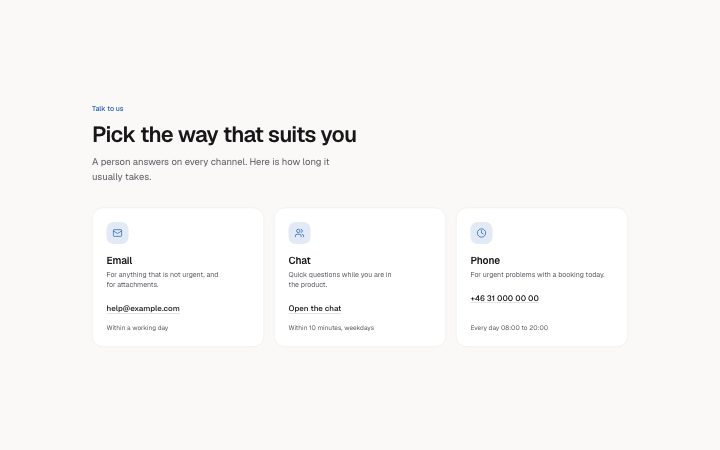
- Two to four ways to reach you as cards: an icon, the channel name, who it is for, the address or number as a link, and how fast you answer. For support pages and anywhere "contact us" is really a choice.
- Category
- A form, a booking panel or office details. The page wires the submit.
Notes
When to use it
Two to four ways to reach you as cards, each with an icon, a name, who it is for, the address as a link and a reply time. Use `contact-form` when you want people to write a message here and now.
Writing for it
- Each channel needs a name (30) and a value (60); the detail (100) is the place to say who should use it, such as 'For urgent faults'. - The response (40) is a small line at the bottom of the card. Give a real number like 'Within one working day'. - The value is shown as the link text and wraps anywhere in a long address, so type the exact email or number, not a description.
Watch out for
Every card links with its href, which is not checked against its value, so a mailto href must be written out yourself. The grid is 2 columns at @2xl and 3 or 4 only when the container is wide enough, so four cards can appear as two rows of two.
Pairs well with
Usage
The block in a page, with its default content (long lists shortened). Every prop is in the table below.
import { Theme } from '@/components/klarhimmel/theme/style';
import { BlockSurface } from '@/components/klarhimmel/blocks/surface';
import ContactChannels from '@/components/klarhimmel/blocks/contact-channels';

export default function Section() {
  return (
    <Theme theme="brand">
      <BlockSurface>
        <ContactChannels props={{
          "eyebrow": "Talk to us",
          "title": "Pick the way that suits you",
          "description": "A person answers on every channel. Here is how long it usually takes.",
          "channels": [
            {
              "icon": "mail",
              "name": "Email",
              "detail": "For anything that is not urgent, and for attachments.",
              "value": "help@example.com",
              "href": "mailto:help@example.com",
              "response": "Within a working day"
            },
            {
              "icon": "users",
              "name": "Chat",
              "detail": "Quick questions while you are in the product.",
              "value": "Open the chat",
              "href": "#chat",
              "response": "Within 10 minutes, weekdays"
            },
            {
              "icon": "clock",
              "name": "Phone",
              "detail": "For urgent problems with a booking today.",
              "value": "+46 31 000 00 00",
              "href": "tel:+46310000000",
              "response": "Every day 08:00 to 20:00"
            }
          ]
        }} />
      </BlockSurface>
    </Theme>
  );
}
Props
The type, default and text limit of every prop. On a real page, over-limit text is kept and checkSections flags it (Installation, Check a page before you ship); this live preview shows the default until it fits. The panel above edits all props.
| Prop | Type | Default | Description |
|---|---|---|---|
eyebrow | string | 'Talk to us' | Text, up to 60 characters. |
title | string | 'Pick the way that suits you' | Text, up to 120 characters. |
description | string | 'A person answers on every channel. …' | Text, up to 300 characters. |
channels | { icon, name, detail, value, href, response }[] | 3 items | List of 2 to 4. Each item: icon ('zap' | 'shield' | 'layers' | 'globe' | 'sparkles' | 'clock' | 'code' | 'palette' | 'lock' | 'chart' | 'users' | 'mail' | 'heart' | 'rocket' | 'search' | 'settings' | 'check' | 'star' | 'book' | 'box' | 'cloud' | 'compass' | 'leaf' | 'gauge'), name, detail, value, href, response. |
headingLevel | '1' | '2' | - | One of '1', '2'. Optional; empty is not rendered. |