Team, list
Install
npx shadcn add @klarhimmel/team-listUsage
import { Theme } from '@/components/klarhimmel/theme/style';
import { BlockSurface } from '@/components/klarhimmel/blocks/surface';
import TeamList from '@/components/klarhimmel/blocks/team-list';

export default function Section() {
  return (
    <Theme theme="brand">
      <BlockSurface>
        <TeamList props={{
          "eyebrow": "Team",
          "title": "Who you will actually talk to",
          "description": "Four people, one inbox. Everyone below answers customers at least once a week.",
          "members": [
            {
              "name": "Elin Sandberg",
              "role": "Co-founder, design",
              "location": "Göteborg",
              "bio": "Designs the product and answers the support inbox on Fridays. Previously ran the front desk at a small hotel, which still shapes how she thinks about arrivals.",
              "photo": {
                "src": "",
                "alt": "Portrait of Elin Sandberg"
              },
              "link": {
                "label": "Write to Elin",
                "href": "mailto:elin@example.com"
              }
            },
            {
              "name": "Oskar Wahl",
              "role": "Co-founder, engineering",
              "location": "Malmö",
              "bio": "Builds the core and keeps the servers quiet. Writes the release notes himself, in plain language.",
              "photo": {
                "src": "",
                "alt": "Portrait of Oskar Wahl"
              },
              "link": {
                "label": "Read his notes",
                "href": "#"
              }
            },
            {
              "name": "Priya Nair",
              "role": "Product",
              "location": "Remote",
              "bio": "Turns customer stories into small, useful changes and says no to the rest.",
              "photo": {
                "src": "",
                "alt": "Portrait of Priya Nair"
              },
              "link": {
                "label": "Join a call",
                "href": "#"
              }
            },
            {
              "name": "Leo Strand",
              "role": "Customer success",
              "location": "Stockholm",
              "bio": "Helps teams get set up in the first week and stay happy in the fiftieth.",
              "photo": {
                "src": "",
                "alt": "Portrait of Leo Strand"
              },
              "link": {
                "label": "Write to Leo",
                "href": "mailto:leo@example.com"
              }
            }
          ]
        }} />
      </BlockSurface>
    </Theme>
  );
}
Install
Import
import Block from '@/components/klarhimmel/blocks/team-list';- team/list
- About
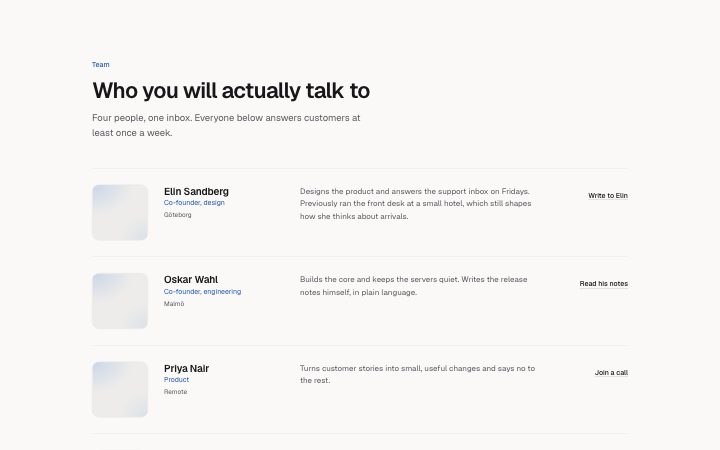
- People as rows: portrait, name and role, a longer bio and one link. Reads like a directory, good for eight people or fewer with something to say. Leave the link label empty to drop the link.
- Category
- The people behind it.
Notes
When to use it
People as directory rows with portrait, name, role, location, a longer bio and one link each. Use it for eight people or fewer who have something to say; for quick faces with short bios `team-grid` is lighter.
Writing for it
- The bio allows 240 characters. Lead with what the person handles, then one detail that makes them a person. - Use the location field (40 characters) for a city or 'Remote'. It sits small under the role and disappears when empty. - Make the link do something specific, such as 'Write to Elin' or 'Read his notes'. A link label is up to the field's own limit, and an empty label drops the link for that row.
Watch out for
On wide containers the row turns into four columns, and the link is pushed to the far right. A row with no link keeps its place but shows a gap there, so mixing rows with and without links looks uneven.
Pairs well with
Usage
The block in a page, with its default content (long lists shortened). Every prop is in the table below.
import { Theme } from '@/components/klarhimmel/theme/style';
import { BlockSurface } from '@/components/klarhimmel/blocks/surface';
import TeamList from '@/components/klarhimmel/blocks/team-list';

export default function Section() {
  return (
    <Theme theme="brand">
      <BlockSurface>
        <TeamList props={{
          "eyebrow": "Team",
          "title": "Who you will actually talk to",
          "description": "Four people, one inbox. Everyone below answers customers at least once a week.",
          "members": [
            {
              "name": "Elin Sandberg",
              "role": "Co-founder, design",
              "location": "Göteborg",
              "bio": "Designs the product and answers the support inbox on Fridays. Previously ran the front desk at a small hotel, which sti…",
              "photo": {
                "src": "",
                "alt": "Portrait of Elin Sandberg"
              },
              "link": {
                "label": "Write to Elin",
                "href": "mailto:elin@example.com"
              }
            },
            {
              "name": "Oskar Wahl",
              "role": "Co-founder, engineering",
              "location": "Malmö",
              "bio": "Builds the core and keeps the servers quiet. Writes the release notes himself, in plain language.",
              "photo": {
                "src": "",
                "alt": "Portrait of Oskar Wahl"
              },
              "link": {
                "label": "Read his notes",
                "href": "#"
              }
            }
          ]
        }} />
      </BlockSurface>
    </Theme>
  );
}
Props
The type, default and text limit of every prop. On a real page, over-limit text is kept and checkSections flags it (Installation, Check a page before you ship); this live preview shows the default until it fits. The panel above edits all props.
| Prop | Type | Default | Description |
|---|---|---|---|
eyebrow | string | 'Team' | Text, up to 60 characters. |
title | string | 'Who you will actually talk to' | Text, up to 120 characters. |
description | string | 'Four people, one inbox. Everyone be…' | Text, up to 300 characters. |
members | { name, role, location, bio, photo, link }[] | 4 items | List of 1 to 8. Each item: name, role, location, bio, photo, link. |
headingLevel | '1' | '2' | - | One of '1', '2'. Optional; empty is not rendered. |