App, assistant tool call
Install
npx shadcn add @klarhimmel/app-assistant-tool-callUsage
import { Theme } from '@/components/klarhimmel/theme/style';
import { BlockSurface } from '@/components/klarhimmel/blocks/surface';
import AppAssistantToolCall from '@/components/klarhimmel/blocks/app-assistant-tool-call';

export default function Section() {
  return (
    <Theme theme="brand">
      <BlockSurface>
        <AppAssistantToolCall props={{
          "state": "succeeded",
          "open": true,
          "name": "northlight.query_metric",
          "summary": "Weekly active users, last 8 weeks, by plan",
          "args": "{\n  \"metric\": \"weekly_active_users\",\n  \"range\": \"8w\",\n  \"group_by\": \"plan\"\n}",
          "result": "{\n  \"rows\": 24,\n  \"total\": 18420,\n  \"largest\": { \"plan\": \"team\", \"share\": 0.46 }\n}",
          "error": "{\n  \"status\": 429,\n  \"code\": \"rate_limited\",\n  \"message\": \"Too many queries. Try again in a moment.\"\n}",
          "duration": "1.2 s",
          "labels": {
            "pending": "Waiting",
            "running": "Running",
            "succeeded": "Done",
            "failed": "Failed",
            "args": "Arguments",
            "result": "Result",
            "error": "Error",
            "empty": "Nothing to show"
          }
        }} />
      </BlockSurface>
    </Theme>
  );
}
Install
Import
import Block from '@/components/klarhimmel/blocks/app-assistant-tool-call';- app/assistant-tool-call
- Category
- Interface sections for signed-in products.
Notes
When to use it
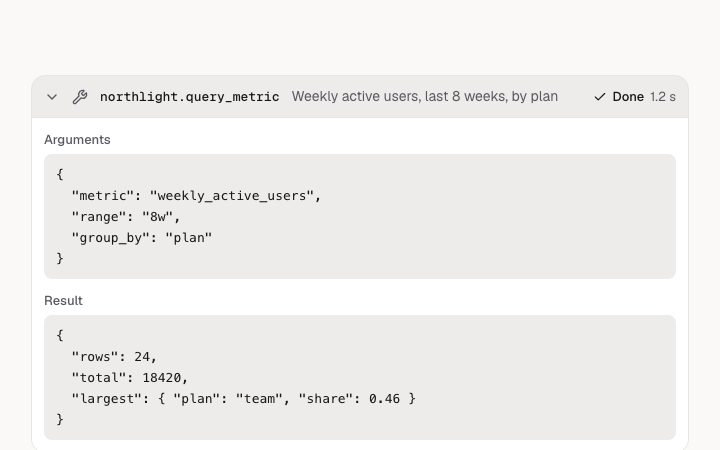
One line in an assistant thread saying which tool ran, with its arguments and result tucked into a disclosure. For something a person must allow first, use `app-assistant-approval`; this block only reports.
Writing for it
- Use `name` (60 characters) for the tool as the person would know it, and `summary` (120) for what it did in one sentence. The summary is what stays visible when the card is closed. - `args`, `result` and `error` each hold up to 20000 characters of plain text and keep their line breaks, so paste formatted JSON rather than a single long line. - `duration` is free text you supply, such as 1.2 s. It only shows once the call has finished, so leave it out for pending and running.
Watch out for
Which section opens depends on `state`: the result part exists only for succeeded and the error part only for failed. An empty `args` or `result` is replaced by the muted `labels.empty` text rather than hiding, so set that label to something that reads naturally.
Usage
The block in a page, with its default content (long lists shortened). Every prop is in the table below.
import { Theme } from '@/components/klarhimmel/theme/style';
import { BlockSurface } from '@/components/klarhimmel/blocks/surface';
import AppAssistantToolCall from '@/components/klarhimmel/blocks/app-assistant-tool-call';

export default function Section() {
  return (
    <Theme theme="brand">
      <BlockSurface>
        <AppAssistantToolCall props={{
          "state": "succeeded",
          "open": true,
          "name": "northlight.query_metric",
          "summary": "Weekly active users, last 8 weeks, by plan",
          "args": "{\n  \"metric\": \"weekly_active_users\",\n  \"range\": \"8w\",\n  \"group_by\": \"plan\"\n}",
          "result": "{\n  \"rows\": 24,\n  \"total\": 18420,\n  \"largest\": { \"plan\": \"team\", \"share\": 0.46 }\n}",
          "error": "{\n  \"status\": 429,\n  \"code\": \"rate_limited\",\n  \"message\": \"Too many queries. Try again in a moment.\"\n}",
          "duration": "1.2 s",
          "labels": {
            "pending": "Waiting",
            "running": "Running",
            "succeeded": "Done",
            "failed": "Failed",
            "args": "Arguments",
            "result": "Result",
            "error": "Error",
            "empty": "Nothing to show"
          }
        }} />
      </BlockSurface>
    </Theme>
  );
}
Props
The type, default and text limit of every prop. On a real page, over-limit text is kept and checkSections flags it (Installation, Check a page before you ship); this live preview shows the default until it fits. The panel above edits all props.
| Prop | Type | Default | Description |
|---|---|---|---|
state | 'pending' | 'running' | 'succeeded' | 'failed' | 'succeeded' | One of 'pending', 'running', 'succeeded', 'failed'. |
open | boolean | true | See the type. |
name | string | 'northlight.query_metric' | Text, up to 60 characters. |
summary | string | 'Weekly active users, last 8 weeks, …' | Text, up to 120 characters. |
args | string | '{
"metric": "weekly_active_users"…' | Text, up to 20000 characters. |
result | string | '{
"rows": 24,
"total": 18420,
…' | Text, up to 20000 characters. |
error | string | '{
"status": 429,
"code": "rate_…' | Text, up to 20000 characters. |
duration | string | '1.2 s' | Text, up to 20 characters. Optional; empty is not rendered. |
labels | { pending, running, succeeded, failed, args, result, error, empty } | {…} | Fields: pending, running, succeeded, failed, args, result, error, empty. |